
This OBDLink MX+ review covers why this Bluetooth OBD2 adapter is the strongest option for iPhone and Android users who want to pair their device with a third-party OBD2 app. The OBDLink MX+ is an open adapter: it connects to any BLE-compatible OBD2 application on iOS or Android, which means it works with OBDFusion, BimmerCode, BimmerLink, Car Scanner ELM OBD2, FORScan, and most other OBD2 apps without restrictions. Its live data throughput is faster than competing BLE adapters at this price range, making it the preferred hardware for real-time data monitoring and logging. It also supports two extended protocols that standard ELM327 adapters ignore: GM-LAN for expanded General Motors module access and Ford MS-CAN for expanded Ford and Lincoln coverage. I covered the adapter’s app compatibility, speed advantages, extended protocol support, and who should buy it versus a purpose-built Bluetooth scanner like the BlueDriver Pro.

About the author: Hello! I’m Kamil Siegień, founder of OBD2 Scout. My diagnostic experience started with an engine rebuild on a 2014 Skoda Superb 1.8 TSI, where tuning from 160 to 222 hp required mastering live data and ECU behavior that basic code readers cannot handle. I am a former BMW and MINI employee and regularly use diagnostic scanners on my own Audi A4 2.0 TFSI.
Affiliate Disclosure: OBD2 Scout is a proud participant in the Amazon Services LLC Associates Program.
OBDLink MX+ Review: Quick Verdict
The OBDLink MX+ is the best Bluetooth OBD2 adapter for iPhone and Android users who already know which OBD2 app they want to use. Its open architecture connects to virtually every BLE-compatible OBD2 application without the closed-ecosystem restrictions that come with purpose-built scanners like the BlueDriver Pro. The live data speed advantage over generic ELM327 adapters is real and matters for anyone logging multiple parameters or monitoring high-speed data during a drive. GM-LAN and Ford MS-CAN support adds module access on those two makes that standard BLE adapters cannot reach. Equinox owners who need that expanded GM module access will find the best available options in my best OBD2 scanner for Chevy Equinox guide.
My verdict: if you use or plan to use a specific iOS or Android OBD2 app and want the best adapter to support it, the MX+ is the right hardware. If you want a scanner that comes with its own complete app experience, repair data, and no research required on app selection, the BlueDriver Pro is the simpler path.
Product Overview
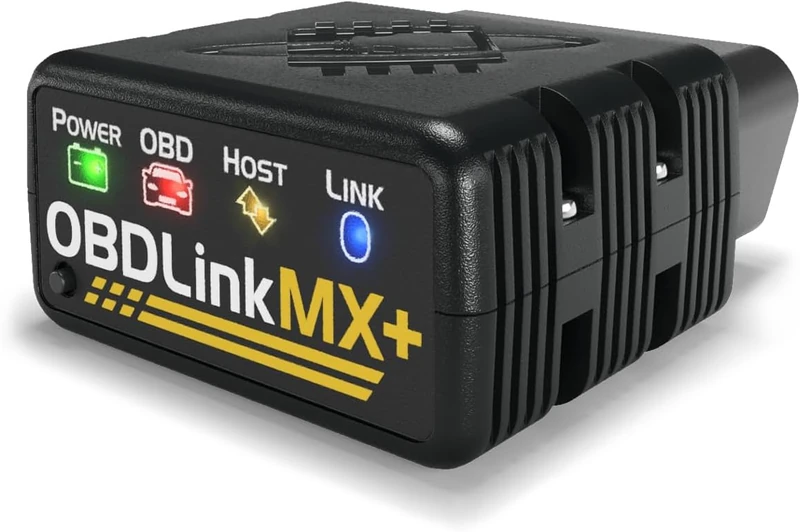
The OBDLink MX+ is a Bluetooth and USB OBD2 adapter that plugs into the vehicle’s OBD2 port and communicates with iOS and Android apps over BLE (Bluetooth Low Energy). It does not have a screen, buttons, or a standalone user interface. Its function is entirely as a communication bridge between the vehicle’s OBD2 data bus and whatever app you pair with it.
OBDLink produces the MX+ specifically for users who want the fastest and most protocol-compatible BLE adapter available. The hardware includes OBDLink’s custom chipset rather than the generic ELM327 chipset used in most budget BLE adapters, which is the source of both the speed advantage and the extended protocol support. The adapter also connects via USB as an alternative to Bluetooth, which is useful for Windows-based diagnostic tools like FORScan on a laptop.
Volvo XC60 T8 PHEV owners pairing the MX+ with OBDFusion or Car Scanner ELM OBD2 for SPA extended PIDs will find the full setup guide in my Volvo XC60 scanner picks.
Specifications
| Specification | Details |
|---|---|
| Product | OBDLink MX+ |
| Type | BLE OBD2 adapter (no screen) |
| Connection | BLE (Bluetooth Low Energy), USB |
| Compatible Apps | Any BLE-compatible OBD2 app on iOS and Android |
| Extended Protocols | GM-LAN, Ford MS-CAN |
| Bidirectional | App-dependent |
| Service Functions | App-dependent |
| Vehicle Coverage | All 1996+ OBD2; expanded via GM-LAN and Ford MS-CAN |
| Updates | Free firmware updates |
| Subscription | None |
Setup and First Use
Plug the MX+ into the OBD2 port, open the iOS or Android OBD2 app, and connect via Bluetooth from within the app. The adapter pairs over BLE the same way any other Bluetooth accessory pairs with an iPhone. No driver installation, no external configuration tool, no separate pairing process outside the app. On iOS, BLE pairing does not require going into the system Bluetooth settings first, which is one of the historic friction points with older classic Bluetooth OBD2 adapters.
The OBDLink app is available for both iOS and Android for users who want OBDLink’s own software. The adapter also connects to FORScan via USB on Windows. App selection beyond that is entirely up to the user.
App Compatibility
The OBDLink MX+’s open protocol architecture is its primary value over cheaper adapters. Compatible apps on iOS and Android include OBDFusion (full-system diagnostics, enhanced mode, live data), BimmerCode (BMW and MINI coding and live data), BimmerLink (BMW and MINI diagnostics), Car Scanner ELM OBD2 (broad live data, extended mode for Toyota, Honda, VAG), DashCommand (data logging and performance), Torque Pro (Android only, extensive PID customization), and most other BLE-compatible OBD2 applications. For owners who want ABS and SRS coverage without managing app configuration, my roundup of the best OBD2 scanners with ABS and SRS access covers standalone alternatives that handle multi-system diagnostics with no app required.
On iPhone specifically, BLE compatibility is the critical requirement. Older classic Bluetooth OBD2 adapters that use the Bluetooth Serial Port Profile do not work with iOS without an MFi (Made for iPhone) certification. BLE adapters like the MX+ connect to iOS natively. This is why the OBDLink MX+ is the standard recommendation for iPhone users who want an open adapter for third-party apps rather than a closed scanner ecosystem. My guide to the top OBD2 adapters for iPhone covers the full BLE-compatible category alongside closed-ecosystem scanners, with specific notes on which products pair with iOS natively and which require workarounds.
Live Data Speed Advantage
Live data throughput is where the OBDLink MX+ distinguishes itself most clearly from generic ELM327 BLE adapters. The custom OBDLink chipset handles OBD2 protocol communication faster than standard ELM327 firmware, which translates to a noticeably faster PID refresh rate when monitoring multiple parameters simultaneously. For a user monitoring coolant temperature, fuel trim, MAF sensor reading, and injector duty cycle at the same time, the difference between 5 updates per second and 2 updates per second is meaningful. For performance logging during a drive, the higher throughput matters for data accuracy.
This speed advantage is most visible in apps like OBDFusion and Car Scanner ELM OBD2, which expose PID polling rates in their settings. On those apps, the MX+ consistently delivers the fastest polling rate available over BLE.
Extended Protocol Support
GM-LAN
GM-LAN is a General Motors proprietary communication protocol used on many GM vehicles for non-powertrain module access beyond the standard OBD2 port. With GM-LAN support, OBD2 apps that recognize the protocol can access additional GM modules that standard ELM327 adapters cannot reach. On GM vehicles where an iOS or Android app specifically supports GM-LAN, the MX+ provides fuller system access than a generic adapter. GM owners who prefer a standalone scanner over an adapter-app combination should read my review of the Autel MK808BT Pro, which covers the tablet option with built-in bidirectional active tests and service functions for GM platforms.
Ford MS-CAN
Ford MS-CAN (Medium-Speed CAN) is a Ford and Lincoln proprietary bus for body control, SYNC, and accessory modules. Access to MS-CAN expands the module visibility on Ford and Lincoln vehicles beyond the powertrain-focused HS-CAN that generic OBD2 adapters see. Apps like FORScan on iOS and Android use MS-CAN support to reach Ford-specific modules for extended diagnostics, service functions, and configuration options. The OBDLink MX+ is one of the few BLE adapters that supports both HS-CAN and MS-CAN on Ford, which is why it is frequently the adapter recommendation in Ford/FORScan communities. For a dedicated handheld scanner with native MS-CAN support and Ford-specific bidirectional functions, my best OBD2 scanners for Ford guide covers the full range from budget code readers to professional-grade Ford tools.
Vehicle Coverage
As a communication adapter, the OBDLink MX+ works with all 1996 and newer OBD2-compliant vehicles for standard engine diagnostics. Extended coverage beyond standard OBD2 depends on the app used: OBDFusion’s enhanced mode adds multi-system access across many makes, Car Scanner ELM provides extended Toyota, Honda, and VAG module coverage, and BimmerCode provides BMW-specific protocol access. GM-LAN expands coverage on General Motors vehicles. Ford MS-CAN expands coverage on Ford and Lincoln. The MX+ itself does not limit vehicle coverage; it is the app that determines diagnostic depth on specific makes. My roundup of professional OBD2 diagnostic tools covers the standalone scanners that make that diagnostic depth decision for you, with built-in databases and bidirectional capability rather than app-dependent coverage.
Hardware and Build Quality
The OBDLink MX+ is a compact OBD2 dongle that sits in the vehicle’s OBD2 port. Build quality is solid relative to the cheap plastic construction typical of generic ELM327 clones. It does not stick out far enough from the port to be a snag hazard in most vehicles. The LED indicator shows connection and communication status. No screen, no buttons, no display beyond the status LEDs. It stays in the OBD2 port during use and is small enough to leave plugged in between diagnostic sessions if preferred.
Forester owners who pair the OBDLink MX+ with OBD Fusion for AVCS and CVT monitoring will find the app and adapter workflow in my dedicated Forester OBD2 scanner guide.
Updates and Total Cost of Ownership
Firmware updates are free and available through the OBDLink app. No subscription is required. The one-time purchase price covers the adapter and all future firmware updates. The app side of the equation is where ongoing cost may exist: some iOS and Android OBD2 apps charge a one-time purchase price (OBDFusion, for example) or an optional extended license (FORScan). The MX+ adapter itself has no recurring cost. Professional shops and advanced users who need standalone bidirectional diagnostics and ECU coding rather than an adapter-app combination should read my review of the Autel MaxiSys Elite II Pro, which delivers that depth without app dependency.
What’s Included
- OBDLink MX+ adapter
- Quick-start guide
Who Is This Adapter Best For?
The OBDLink MX+ is the right adapter for iPhone or Android users who already use or have chosen a specific OBD2 app. BMW and MINI owners who use BimmerCode for vehicle coding. Ford owners who use FORScan for extended Ford module access. Users of OBDFusion who want the fastest live data refresh rate available over BLE. Advanced DIYers who want to choose their own app for specific diagnostic needs rather than accepting the limitations of a closed scanner ecosystem. Anyone who monitors multiple live data PIDs simultaneously and needs a higher data throughput than generic adapters provide.
Volvo XC90 owners using Car Scanner ELM OBD2 or OBDFusion for SPA platform diagnostics get full extended PID access through the MX+, which I cover in my XC90 SPA diagnostic guide.
Outback owners who use OBD Fusion for Subaru SSM2 extended diagnostics will find the adapter and app combination in my Outback scanner picks for SSM2 diagnostics.
Ford Explorer owners who use FORScan for MS-CAN body module access and want a comparison of the OBDLink adapters alongside other options will find it in my Explorer scanner options.
Who Should Skip It?
Skip the OBDLink MX+ if you want a scanner that comes with a complete app experience and does not require research into which third-party iOS app fits your vehicle and diagnostic needs. The BlueDriver Pro is the right tool for that: a complete out-of-the-box solution with its own well-developed app, verified fix data, and no app-selection homework. Skip the MX+ if you need a scanner with physical buttons and a screen for shop or roadside use where a phone is not always at hand. BMW owners looking for a standalone dedicated diagnostic tool instead of the adapter-app combination should look at the Foxwell NT530 Plus for BMW, which covers the full BMW diagnostic stack without requiring an iPhone or any third-party app.
Native MS-CAN and SW-CAN protocol support reaches Ford modules on medium- and single-wire CAN buses that generic Bluetooth adapters cannot access.
2.1 Mbps data rate is the fastest among Bluetooth OBD2 adapters, making a measurable difference when logging multiple live data streams simultaneously.
FORScan combination used to disable Ford’s auto-start-stop, recalibrate the speedometer, and activate trailer sway control, all without a dealer scan tool.
Pros and Cons
| Pros | Cons |
|---|---|
| Open architecture works with OBDFusion, BimmerCode, Car Scanner ELM, FORScan, and virtually any BLE OBD2 app | No built-in app; requires choosing and configuring a third-party iOS or Android app |
| Fastest live data throughput of any BLE OBD2 adapter, for better PID refresh rates | |
| GM-LAN support for expanded General Motors module access | |
| Ford MS-CAN support for expanded Ford and Lincoln module access via FORScan | |
| BimmerCode compatible for BMW hidden-feature coding on iPhone and Android | |
| USB connection as an alternative to Bluetooth for Windows apps | |
| No subscription, free firmware updates |
Subaru Crosstrek owners using the OBDLink MX+ with OBD Fusion for CVT and EyeSight monitoring will find the compatible setup in my Crosstrek OBD2 scanner roundup.
How It Compares With Alternatives
OBDLink MX+ vs BlueDriver Pro
The BlueDriver Pro is the closed-ecosystem alternative. It has its own well-developed app, provides full-system ABS, SRS, and transmission code access on supported vehicles, includes verified fix reports from ASE-certified data, and requires no app selection research. It does not work with third-party apps. The MX+ is the opposite: maximum app flexibility and the best BLE throughput, but requires the user to select, configure, and learn a third-party app. For a user who wants to pick the best tool for a specific use case (BimmerCode for BMW coding, FORScan for Ford access, OBDFusion for broad enhanced diagnostics), the MX+ is the more capable foundation. For a user who wants a complete solution with minimal setup, the BlueDriver Pro is the simpler choice.
Hyundai owners evaluating wireless OBD2 tools will find both the OBDLink MX+ and BlueDriver Pro ranked in my Hyundai OBD2 scanner guide, where Hyundai extended PID coverage and IVT access determine which adapter fits best.
Tucson owners who want to compare the OBDLink MX+ and BlueDriver Pro for CANFD extended PIDs and AWD module coverage on their platform will find both evaluated in my best OBD2 scanner for Hyundai Tucson guide.
Elantra owners who want the OBDLink MX+ evaluated against BlueDriver for IVT module access and Theta II live data monitoring will find both in my Elantra OBD2 diagnostic guide.
Santa Fe owners who want the OBDLink MX+ evaluated against BlueDriver for HTRAC AWD extended PID access and 8DCT fault monitoring will find the comparison in my Santa Fe OBD2 diagnostic guide.
OBDLink MX+ vs OBDLink EX
The OBDLink EX is a lower-cost OBDLink adapter optimized specifically for FORScan and Ford/Lincoln use. It supports MS-CAN and HS-CAN on Ford and Lincoln at a lower price than the MX+. If Ford or Lincoln with FORScan on iOS or Android is the only use case, the EX is the more cost-effective option. The MX+ adds GM-LAN, faster overall data throughput, and broader multi-make app compatibility beyond Ford, making it the better choice for users with multiple vehicles or multiple app requirements. Trax owners evaluating the MX+ as their primary GM tool can compare it against other top picks in my best OBD2 scanner for Chevy Trax guide.
F-150 owners deciding between the OBDLink EX and MX+ based on FORScan protocol depth, model-year coverage, and dual CAN bus behavior will find both adapters evaluated in my F-150 scanner options.
My Final Verdict on the OBDLink MX+
The OBDLink MX+ is the best BLE OBD2 adapter for iPhone and Android users who already know which third-party OBD2 app they want to use. The fastest live data throughput in the BLE adapter category, open compatibility with virtually every iOS and Android OBD2 app, and GM-LAN and Ford MS-CAN extended protocol support make it the strongest hardware foundation for the app-centric OBD2 diagnostic approach. The trade-off is the setup investment: you need to research and configure the right app for your vehicle and use case. Chevy and GM owners who need a dedicated bidirectional scanner rather than an app-dependent adapter will find better GM-specific coverage in my best OBD2 scanners for Chevy guide, which covers GM-dedicated tools with CKP relearn, ABS bleed, and full module access.
For BMW and MINI owners using BimmerCode on iPhone, Ford owners using FORScan, users of OBDFusion for multi-system diagnostics, or anyone who values choosing their own app over a fixed closed ecosystem, the OBDLink MX+ is the right adapter to pair with that workflow. BMW and MINI owners who want a dedicated hardware overview before choosing between the adapter-app approach and a standalone tool will find my roundup of the best OBD2 scanners for BMW covers the full range of options at each price point.
Frequently Asked Questions
Does the OBDLink MX+ work with iPhone?
Yes. The OBDLink MX+ uses BLE (Bluetooth Low Energy), which pairs natively with iPhone without needing to go into the iOS Bluetooth settings first or using a classic Bluetooth connection. It works with OBDFusion, BimmerCode, BimmerLink, Car Scanner ELM OBD2, and virtually any BLE-compatible OBD2 app available on the App Store.
What OBD2 apps does the OBDLink MX+ work with?
The OBDLink MX+ is compatible with any BLE-compatible OBD2 application on iOS and Android. Commonly used apps include OBDFusion, BimmerCode, BimmerLink, Car Scanner ELM OBD2, Torque Pro (Android), DashCommand, FORScan (iOS and Android), and the OBDLink app. The adapter does not restrict compatibility to a specific app ecosystem.
Volvo XC40 owners using Car Scanner ELM OBD2 for CMA platform diagnostics will find the tools confirmed for full CMA module access in my Volvo XC40 scanner picks.
What is GM-LAN and does the OBDLink MX+ support it?
GM-LAN is a General Motors proprietary communication protocol for extended module access beyond standard OBD2 on GM vehicles. The OBDLink MX+ supports GM-LAN, which allows compatible iOS and Android apps to access additional GM modules that standard ELM327 adapters cannot reach. Coverage depends on the specific GM vehicle and the third-party app used.
Does the OBDLink MX+ work with BimmerCode for BMW coding?
Yes. The OBDLink MX+ is compatible with BimmerCode on iPhone and Android. BimmerCode uses the MX+ as a communication bridge between the BMW’s OBD2 port and the coding interface in the BimmerCode app. It supports F-series and G-series BMW models as defined by BimmerCode’s own vehicle compatibility list.
Does the OBDLink MX+ require a subscription?
No. The OBDLink MX+ adapter itself has no subscription or annual fee. Free firmware updates are available through the OBDLink app. Third-party apps you pair with the MX+ may have their own pricing (one-time purchase, in-app purchase, or optional extended license), but those costs are separate from the adapter itself.
How is the OBDLink MX+ faster than other BLE adapters?
The OBDLink MX+ uses a custom OBDLink chipset instead of the standard ELM327 firmware used in generic BLE adapters. The custom chipset handles OBD2 protocol communication with faster processing, which translates to a higher PID polling rate when reading live data. For real-time monitoring of multiple parameters or data logging during a drive, this higher throughput provides a more accurate and responsive data stream than generic adapters deliver.