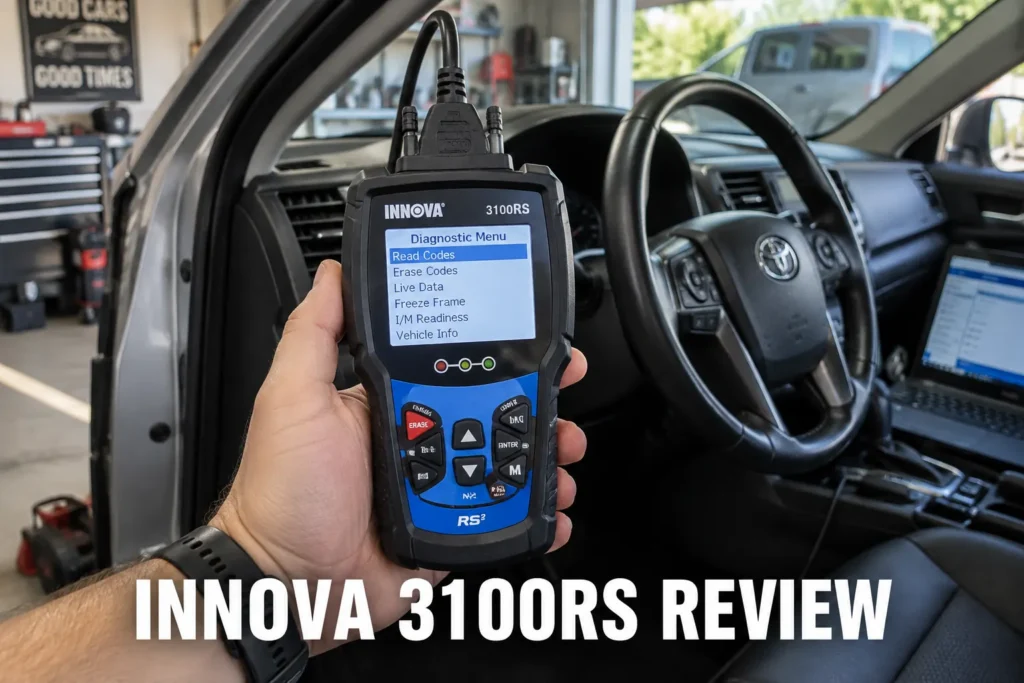
This Innova 3100RS review covers what this budget standalone OBD2 scanner can realistically do for an everyday driver. The 3100RS is a wired scanner with a built-in color screen that reads engine and ABS codes, shows I/M readiness status, and displays live data without requiring a phone, an app, or a subscription. At around $89, it is aimed at drivers who want a simple, dedicated tool they can keep in the glovebox and use in under a minute. I went through its diagnostic capabilities, screen experience, ABS coverage, the optional RepairSolutions2 app, and where its limitations start to matter so you can decide whether it fits your situation or whether a different scanner would serve you better.

About the author: Hello! I’m Kamil Siegień, founder of OBD2 Scout. My diagnostic experience started with an engine rebuild on a 2014 Skoda Superb 1.8 TSI, where tuning from 160 to 222 hp required mastering live data and ECU behavior that basic code readers cannot handle. I am a former BMW and MINI employee and regularly use diagnostic scanners on my own Audi A4 2.0 TFSI.
Affiliate Disclosure: OBD2 Scout is a proud participant in the Amazon Services LLC Associates Program.
Innova 3100RS Review: Quick Verdict
The Innova 3100RS is the best standalone OBD2 scanner under $100 for drivers who want a no-setup, no-phone experience. Plug it into the OBD2 port, turn the ignition on, and the built-in color screen shows your codes, their definitions, and whether your emissions monitors are ready. ABS code reading is included at this price, which is not standard across all budget wired scanners. There is no subscription, no account to create, and no app required for the core functions to work. My roundup of the best budget OBD2 scanners covers the full field at this price tier, including how the 3100RS compares to the other wired and Bluetooth options under $100.
The limitations are clear and worth knowing upfront: there are no SRS (airbag) codes, no service reset functions, and no bidirectional active tests. If any of those matter for your situation, the Autel AutoLink AL619 adds SRS and four service resets for similar money, and the BlueDriver Pro adds full-system coverage with a verified fix database if you are comfortable using a smartphone. For a driver who just needs to know why a warning light came on and whether the car will pass an emissions test, the 3100RS is as simple and reliable as it gets at this price.
Product Overview
The Innova 3100RS is a wired code reader with a built-in color display. It connects directly to the OBD2 port under the dashboard via a cable and reads diagnostic data without needing a paired phone. The scanner falls into the enhanced code reader class: it goes beyond a basic engine-only code reader by including ABS diagnostics and I/M readiness status on the screen, but it does not reach the full-system diagnostic depth of app-based Bluetooth tools or handheld professional scanners.
Innova is a US brand with a long history in the DIY automotive market. The 3100RS has been a consistently recommended budget option for drivers who prioritize simplicity and reliability over maximum feature coverage. The core workflow is plug in, read, decide, clear if needed.
Specifications
| Specification | Details |
|---|---|
| Product | Innova 3100RS |
| Scanner Type | Wired standalone code reader |
| Connection | Wired OBD2 cable |
| Display | Built-in color screen |
| Generic OBD-II | Yes |
| ABS Diagnostics | Yes (vehicle-dependent) |
| SRS Diagnostics | No |
| Bidirectional Control | No |
| Service Functions | None |
| I/M Readiness | Yes |
| Live Data | Yes |
| Freeze Frame | Yes |
| RepairSolutions2 App | Optional (wireless) |
| Updates | Via USB |
| Subscription | None required |
| Vehicle Compatibility | 1996+ OBD2 (US) |
Setup and First Use
Setup is as close to zero as any OBD2 scanner gets. Plug the cable into the OBD2 port under the dashboard on the driver’s side. Turn the ignition to the on position without starting the engine. The scanner powers on from the OBD2 port and the screen comes to life. No pairing, no account, no download. The main menu shows the options available: read codes, erase codes, I/M readiness, live data, and freeze frame.
The 3100RS reads the VIN and vehicle information from the OBD2 data stream. You do not need to manually enter a vehicle profile. From power-on to first code result takes under a minute in most cases. For a driver who has never used a scanner before, the experience is genuinely intuitive.
Diagnostic Features and Capabilities
Generic OBD-II Functions
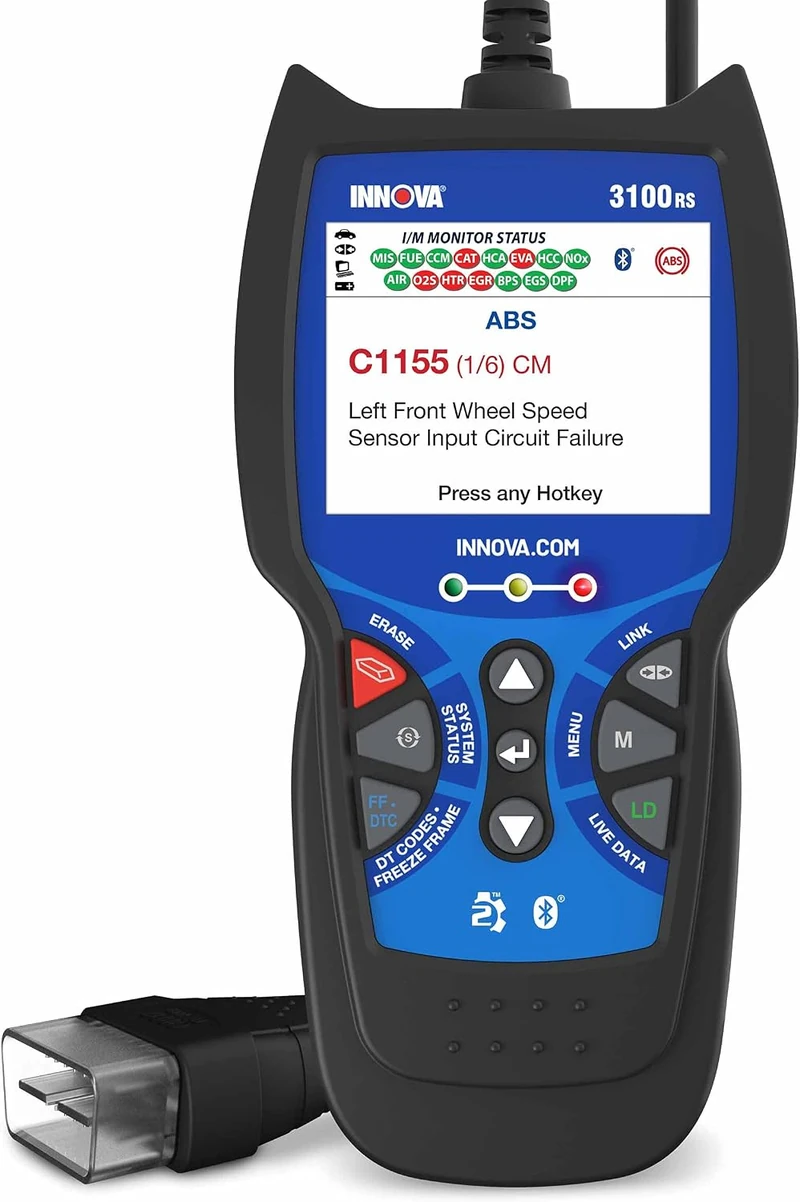
The 3100RS handles all standard OBD-II functions. Read and clear stored and pending DTCs, view freeze frame data from the moment a fault was logged, check I/M readiness monitor status, and view live engine parameter data on screen. Code definitions are shown directly on the screen alongside the code number, so you do not need to look anything up separately for a basic identification.
Permanent DTCs, which cannot be cleared manually and require a completed drive cycle, are also displayed. This matters for emissions testing in states that check permanent codes in addition to readiness monitors.
ABS Diagnostics
ABS code reading is the key capability that puts the 3100RS above basic code readers at this price. Most wired scanners under $60 read only engine codes. The 3100RS reads and clears ABS fault codes on supported vehicles, which means you can identify the cause of an ABS warning light at home without a shop visit to pull the code. Coverage is vehicle-dependent. Not every make and model year will have full ABS code access, but domestic vehicles and common Japanese and Korean makes are generally well-supported. For Toyota owners looking for a scanner with the broadest full-system coverage on the platform, my guide to OBD2 scanners for Toyota covers the options from budget wired tools up to dedicated multi-system handhelds.
The ABS coverage is read and clear only. There are no bidirectional ABS tests, no electronic brake bleeding, and no ABS actuator commands. The 3100RS tells you what the code is. Diagnosing the root cause and repairing it is still up to you. My roundup of bidirectional OBD2 scanners covers the tools that add active test capability for ABS and other modules, from mid-range handhelds to professional platforms with electronic brake bleeding and component activation.
SRS (Airbag) Codes
The 3100RS does not read SRS or airbag system codes. If your airbag warning light is on, this scanner will not tell you why. That is a meaningful gap at this price point. The Autel AutoLink AL619 adds SRS code reading alongside ABS for roughly the same price and also includes four service reset functions. If the airbag light is what you need to diagnose, the AL619 is the better choice. My guide to OBD2 scanners with ABS and SRS coverage covers the options that read both module types, including the budget tools that close the airbag code gap the 3100RS leaves open.
Service Functions
There are no service reset functions on the 3100RS. It cannot reset the oil life monitor, service the electronic parking brake, register a new battery, or perform any other maintenance procedure reset. If service resets are part of your routine, a scanner with that capability is a better fit.
I/M Readiness and Emissions Testing
I/M readiness is one of the most practical features on the 3100RS for everyday drivers. The screen shows the status of each emissions monitor as ready or not ready, using a clear color-coded display. Before taking your vehicle for a state inspection, you can check which monitors have completed their drive cycles and which have not. Clearing codes resets these monitors to incomplete, so the 3100RS makes it easy to confirm the vehicle is ready before the inspection instead of failing on a monitor that has not run.
This is particularly useful after a battery replacement or a code clear, when several monitors may need a complete drive cycle before they show ready. Being able to check the status at home before driving to the inspection station saves a wasted trip.
Vehicle Compatibility and Protocol Support
The 3100RS works with all 1996 and newer OBD2-compliant vehicles in the United States. Standard OBD-II protocol coverage is comprehensive across every compliant vehicle. ABS diagnostics are make and model-year dependent. Domestic vehicles (GM, Ford, Chrysler), popular Japanese makes (Toyota, Honda, Nissan), and Korean brands (Hyundai, Kia) generally have solid ABS coverage. European vehicles can be more limited for ABS code access on this class of scanner. For BMW owners who need reliable ABS and full-system access on the marque, my guide to OBD2 scanners for BMW covers the tools built for the platform’s diagnostic architecture, from BMW-specific handhelds to professional-grade tablets.
Live Data and Freeze Frame
Live data displays engine sensor readings in real time on the built-in screen. You can monitor parameters such as engine RPM, coolant temperature, throttle position, O2 sensor voltage, and fuel trim values as the engine runs. The screen is small relative to a phone display, so viewing multiple parameters simultaneously is limited, but for confirming a sensor reading or watching a value during a warm-up cycle it is fully functional.
Freeze frame data records the sensor values and operating conditions stored at the moment a fault code was triggered. This snapshot gives you a starting point for diagnosing intermittent faults that do not always produce a code under normal driving conditions.
Hardware and Build Quality
The 3100RS is a compact handheld unit with a cable that connects to the OBD2 port. The build quality is solid for a budget scanner: the casing is durable plastic, the buttons are responsive, and the cable is long enough to hold the scanner on the seat or dashboard while reading codes from the driver’s seat. The color screen is readable in normal lighting conditions. Direct sunlight can wash it out slightly, which is common for scanners in this price class.
The scanner draws power from the OBD2 port and has no internal battery. Updates are applied via USB using Innova’s update tool on a PC. Updates are free and Innova releases them periodically to add vehicle coverage.
RepairSolutions2 App
The Innova RepairSolutions2 app is an optional companion that works wirelessly with the 3100RS after you scan your vehicle. It adds repair cost estimates for your specific code and vehicle, code definitions with probable causes, and maintenance reminders. The app is free to download and the basic features are included without a paid subscription, though some advanced features may require an upgrade.
The app is genuinely useful for a driver who wants more context than the code number alone. It does not add any additional diagnostic capability to the scanner itself. The scanner’s on-screen code definitions cover the basics without needing the app at all.
Updates, Subscription and Total Cost of Ownership
The 3100RS requires no subscription. The purchase price is the total cost of the scanner. Software updates are free and delivered via USB. There are no cloud fees, annual renewals, or app subscriptions required to maintain full scanner functionality. Innova has a good track record of releasing vehicle coverage updates over time for this product line.
What’s Included
- Innova 3100RS scanner
- OBD2 cable
- USB cable
- Quick start guide
Who Is This Scanner Best For?
The 3100RS is the right scanner for a driver who wants the simplest possible OBD2 experience. No phone pairing, no account creation, no app setup. If your check engine light or ABS light comes on, you plug this in and have an answer in under a minute. It is also the right tool for anyone who regularly needs to verify I/M readiness before an emissions inspection. Keeping one in the glovebox costs less than a single diagnostic fee at most shops.
It is particularly well-suited to drivers who share a vehicle, manage a small fleet of personal or family cars, or want a scanner they can hand to someone with no diagnostic background and have them use correctly without instruction.
Who Should Skip It?
Skip the 3100RS if you need SRS or airbag code access. Skip it if you need an oil reset, EPB service, or any other service function. Skip it if you want repair suggestions or verified fix data beyond generic code definitions. Skip it if you need to monitor complex live data across multiple parameters on a larger screen. For any of those needs, the Autel AutoLink AL619 adds SRS and service resets, and the BlueDriver Pro adds a much deeper diagnostic experience through the BlueDriver app. For a wired alternative that adds SRS code access and multi-system scanning without requiring a phone, my review of the Foxwell NT630 Plus covers a handheld mid-range option that fills several of the gaps the 3100RS leaves open.
A color-coded display groups diagnostic results into visual severity categories — green for no issue, yellow for pending, red for active fault — reducing the time needed to assess scan results during a quick vehicle check.
The All Codes function reads engine, ABS, and SRS fault codes from a single scan session, covering the three systems most commonly involved in check engine light, brake warning, and airbag indicator complaints.
Battery and charging system test capabilities measure cranking voltage, alternator output, and battery health directly from the OBD-II connection, adding electrical diagnostics to what is typically a code-only tool at this price point.
Pros and Cons
| Pros | Cons |
|---|---|
| Works without a phone: built-in screen shows codes, definitions, and I/M readiness | No SRS or airbag code reading |
| ABS code reading included at a budget price | No service reset functions of any kind |
| I/M readiness clearly displayed for emissions test preparation | No bidirectional active tests |
| Optional RepairSolutions2 app adds repair cost estimates when needed | |
| No subscription required | |
| Live data and freeze frame available on the built-in screen | |
| Free USB updates from a trusted US brand |
How It Compares With Alternatives
Innova 3100RS vs Autel AutoLink AL619
The AL619 is the most direct upgrade from the 3100RS. It adds SRS (airbag) code reading, four service reset functions including oil reset and EPB, and a color display of similar size. Pricing is comparable. If the airbag light is something you need to diagnose, or if service resets come up in your maintenance routine, the AL619 is the better buy. If you only need engine and ABS codes and value Innova’s track record and the RepairSolutions2 app, the 3100RS holds up. The choice comes down to whether airbag and service reset coverage matters to you.
Innova 3100RS vs BlueDriver Pro
The BlueDriver Pro costs more but covers significantly more ground: engine, ABS, SRS, transmission, and TPMS codes on supported vehicles, service functions including oil reset and EPB, verified fix data from ASE-certified mechanics, and live data graphing on your phone screen. It requires a smartphone and works exclusively with the BlueDriver app. If you are comfortable using an app and want the deepest diagnostic capability under $120, the BlueDriver Pro is a much more capable tool. The 3100RS wins only on simplicity: no phone, no app, plug in and read. Drivers who prefer the app-based approach should read my review of the OBDLink MX+, the BLE adapter that pairs with OBDFusion, BimmerCode, and virtually every iOS and Android diagnostic app on the market.
Innova 3100RS vs TOPDON ArtiLink500
The TOPDON ArtiLink500 adds more diagnostic depth, a larger display, and additional system coverage at a slightly higher price. For a driver who wants to step up from basic code reading without going to a phone-based system, the ArtiLink500 is worth considering. The 3100RS is the better choice for anyone who specifically wants the plug-in simplicity of the Innova platform and the RepairSolutions2 app integration.
My Final Verdict on the Innova 3100RS
The Innova 3100RS earns its place as the best standalone budget OBD2 scanner for drivers who want simplicity above everything else. No phone, no app, no account, no subscription. Plug it in and the screen gives you what you need: the code, the definition, whether your ABS threw a fault, and whether your emissions monitors are ready for inspection. The no-SRS limitation is real, and any driver whose airbag light is on should look at the Autel AL619 instead. For everything else the 3100RS is built to handle, it handles it cleanly.
At around $89, it costs less than one shop diagnostic fee and pays for itself the first time you use it to decide whether a warning light is worth worrying about before your next oil change or whether it needs immediate attention. That is the right value proposition for a tool in this class.
Frequently Asked Questions
Does the Innova 3100RS read ABS codes?
Yes. ABS code reading is included on the 3100RS on supported vehicles. Coverage varies by make, model, and year. Domestic vehicles and common Japanese and Korean makes are generally well-supported. The scanner reads and clears ABS fault codes but does not perform bidirectional ABS tests or electronic brake bleeding.
Does the Innova 3100RS read SRS or airbag codes?
No. The 3100RS does not read SRS or airbag system codes. If your airbag warning light is on, you will need a scanner with SRS capability. The Autel AutoLink AL619 reads SRS and ABS codes at a comparable price and also includes four service reset functions.
Does the Innova 3100RS require a subscription?
No. The 3100RS works fully out of the box with no subscription, no app account, and no recurring fees. Software updates are free via USB. The optional RepairSolutions2 app is free to download, with some advanced features available as a paid upgrade, but the app is not required for the scanner’s core functions.
Does the Innova 3100RS work without a phone?
Yes. The built-in color screen displays codes, code definitions, I/M readiness status, and live data without any phone or app. The optional RepairSolutions2 app can add repair cost estimates and additional code context when connected wirelessly, but the scanner operates independently without it.
Can the Innova 3100RS reset the check engine light?
Yes. After reading and reviewing the fault codes, you can use the erase function to clear the codes and turn off the check engine light. If the underlying fault is still present, the light will return. Clearing a code is not a repair, and the code will come back if the root cause has not been addressed.
How does the Innova 3100RS compare to other budget OBD2 scanners?
The 3100RS stands out in the budget standalone category because it includes ABS code reading and I/M readiness on a built-in screen without requiring a phone. Most wired scanners under $60 read engine codes only. The 3100RS adds ABS and clear emissions readiness status for around $89, which makes it a strong value for that specific use case. This Innova 3100RS review covers the full comparison against the AL619, BlueDriver Pro, and ArtiLink500 in the section above.
What vehicles does the Innova 3100RS support?
The 3100RS supports all 1996 and newer OBD2-compliant vehicles in the United States for standard engine diagnostics. ABS code coverage is vehicle-dependent and works best on domestic, Japanese, and Korean makes. European vehicle ABS coverage may be more limited. Standard OBD-II functions including code reading, live data, freeze frame, and I/M readiness work on all compliant US vehicles.